Essential Apps you need for Traveling in China in 2026
Due to internet restrictions, the apps that you rely on at home may be very different in China. Many common apps, including Google Search, Google Maps, Gmail, WhatsApp, YouTube, and Uber, either don’t work in mainland China or won’t work reliably unless you set them up before you go.
This is important to know because you’ll rely on your phone for many things while traveling in China, which can be difficult without the right apps. Whether you’re getting around a major city or heading to a smaller town, your phone can make almost everything easier, including paying, ordering food, buying train and attraction tickets, taking public transit, booking rides, and more. You can still manage without your phone, of course, but it will take more time, effort, and patience.
I recommend downloading the key apps below and setting up your accounts before you leave, because after you arrive, Google Play will not be directly accessible. Also, some Chinese apps have separate international and mainland China versions, so downloading them in advance helps you make sure you have the correct version before you land. Before your trip, open each app and get a feel for the basics so you don’t have to figure out how to use them while you’re tired from a long day of travel.
Below are the apps I consider essential for traveling in China, plus a few extras worth having. If you have a question about any of them, leave a comment and I’ll do my best to help.
Quick Overview:
Essential Apps for Traveling in China
1. WeChat
WeChat is the one app that I would tell every traveler to install before arriving in China. It’s helpful for messaging, mobile payments, public transit, ride-hailing, QR-code ordering at restaurants, and plenty more, so you can expect to use it every day.
2. Amap (Gaode Maps)
Amap, also called Gaode Maps, is my go-to navigation app in China. It supports English, gives detailed directions, and is more useful than Google Maps or Apple Maps.
3. Trip.com
Trip.com is one of the easiest ways for international visitors to book things in China like hotels, flights, trains, tours, and attraction tickets, often with more local options than the big international booking sites.
4. Google Translate / Microsoft Translator
Google Translate is still my go-to translation app if you can access it through an eSIM or VPN. If not, Microsoft Translator is a good alternative for menus, signs, and basic conversations.
5. DeepSeek / Qwen
DeepSeek and Qwen are China-based AI tools, and both are free to use. They’re helpful when a literal translation isn’t enough, like when you want to understand a menu item, a museum exhibit, a historical site, or the story behind an attraction.
6. A Reliable eSIM
Buy an eSIM before you arrive so you can get online as soon as you land. A good eSIM can also help you access services you normally use back home, such as YouTube, Gmail, and Google Search, without needing a VPN.
Other Helpful Apps to Set Up Before Your China Trip
Alipay
Alipay is the other major payment app in China, and it’s worth setting up alongside WeChat for payments, shopping, public transit, and as a backup if WeChat Pay doesn’t work.
Meituan
Meituan is one of China’s most-used apps for food delivery, restaurant deals, and local services. You can use it to order food, get medicine and everyday essentials delivered, find restaurant discounts, and book things like spas, amusement parks, and attraction tickets.
DiDi
DiDi is basically China’s Uber, and it’s a useful backup if you can’t use the ride-hailing feature in Amap. You can enter addresses in English, fares are usually reasonable, and you can pay with Alipay or WeChat Pay.
VPN
A VPN can help you access apps and websites that don’t normally work in mainland China, such as WhatsApp, Instagram, and Google services. Install and test it before you arrive, because setting one up after you’re already in China can be much more difficult.
Railway 12306
Railway 12306 is worth having if you plan to take high-speed trains, but for most international travelers, booking through Trip.com is easier.
1. The One App You Really Need: WeChat
If you only set up one app before your trip to China, it should be WeChat. It lets you message people easily, pay on the go, and get through your entire trip without needing to carry cash.
WeChat is also much more than just a messaging or payment app, which you’ll realize quickly when traveling in China. You can do numerous things through WeChat Mini Programs without downloading separate apps, such as:
- Ride the subway and buses
- Book rides
- Order food by scanning QR codes in restaurants
- Order food delivery
- Unlock shared bikes
- Buy attraction tickets
- Reserve entry for popular attractions and museums
Even if you don’t know anyone in China, I suggest setting up WeChat for messaging so you can add a tour guide, someone at your hotel, or any local who you’re interacting with. The messaging feature is helpful for things like confirming an address, asking how to get somewhere, contacting your hotel, or getting help.
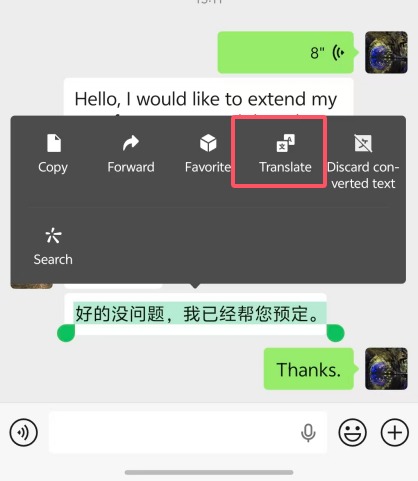
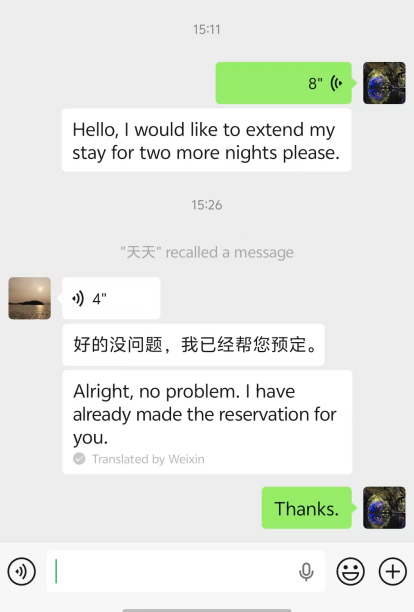
You can also translate chats into English and other languages with one tap, which is extremely helpful if you don’t speak Chinese.
You can even add me on WeChat (my account: ifuday) and if you run into problems during your trip, I’ll help where I can!
Read More: How to Travel in China Without Speaking Any Chinese
Before you leave, make sure WeChat is ready to use:
- Create and verify your account. You’ll need your passport, and verification can sometimes take about a day.
- Set up WeChat Pay and link an international Visa or Mastercard before you arrive.
Once you’re set up, WeChat Mini Programs let you access lots of services without leaving the app. For example, to book a DiDi ride, search for “DiDi” in WeChat, open the Mini Program, and log in with your WeChat account.
WeChat itself supports multiple languages, but many Mini Programs are mostly in Chinese. Fortunately, WeChat has a built-in translation feature, so you can translate an entire Mini Program into English or another language with one tap.


Pro-tip: if you’re traveling to China alone, ask your family to install and set up WeChat before you go. That way, even if WhatsApp doesn’t work reliably in China, you can still stay in touch with them on WeChat.
Read More: WeChat – A Complete Guide to Using WeChat & WeChat Pay in China
Alternative: Alipay
Alipay can do many of the same things as WeChat, including messaging, but very few people in China use it to chat. For most people, Alipay is mostly just a payment app.
If you don’t need messaging, Alipay can work well as an alternative to WeChat.
Still, I recommend setting up both WeChat Pay and Alipay because mobile payments are used almost everywhere in China, and very few people rely on cash these days. Although most shops technically still accept cash, they may not always have change, so it’s a good idea to have more than one mobile payment option.
Alipay is also a useful backup if you have any problems using WeChat Pay.
This can happen if you’re using an eSIM or VPN and your connection slows down or becomes unstable, which can make payments fail or pages load slowly. If that happens, try switching to Alipay.
Having both apps ready gives you one less thing to worry about during your trip.
What Are Mini Programs in WeChat and Alipay?
Mini Programs are basically small, simplified apps that run inside WeChat or Alipay.
They’re created by attractions, restaurants, ride-hailing services, shops, and government agencies. Instead of downloading a separate app for each thing, you can open these Mini Programs right inside WeChat or Alipay, and they don’t take up much space on your phone.
Once your WeChat Pay or Alipay is set up, opening and paying inside Mini Programs is generally quick and easy.
You can search for a Mini Program by name in WeChat or Alipay, or scan a QR code at a shop, restaurant, hotel, or attraction.
Most Mini Programs also let you log in with your WeChat or Alipay account with one tap, so you don’t need to create another account. You can also save the Mini Programs you use often, so they’re easy to find later.
For travelers, I recommend saving these two Mini Programs in particular:
- DiDi — one of China’s largest ride-hailing services.
- Meituan — China’s biggest app for food delivery, restaurant deals, and local services.
Amap (Gaode Maps)
A good navigation app makes a huge difference when you’re traveling in China, but Google Maps isn’t reliable enough here to be your main navigation app. Even if you can access it through a VPN or eSIM, its local data is limited, so it can be frustrating when you’re trying to find restaurants, use public transit, or figure out the best way around town.
One of the most widely used map apps in China is Amap, also called Gaode Maps. The good news is that Amap now supports English, which makes it much easier for international travelers to use.
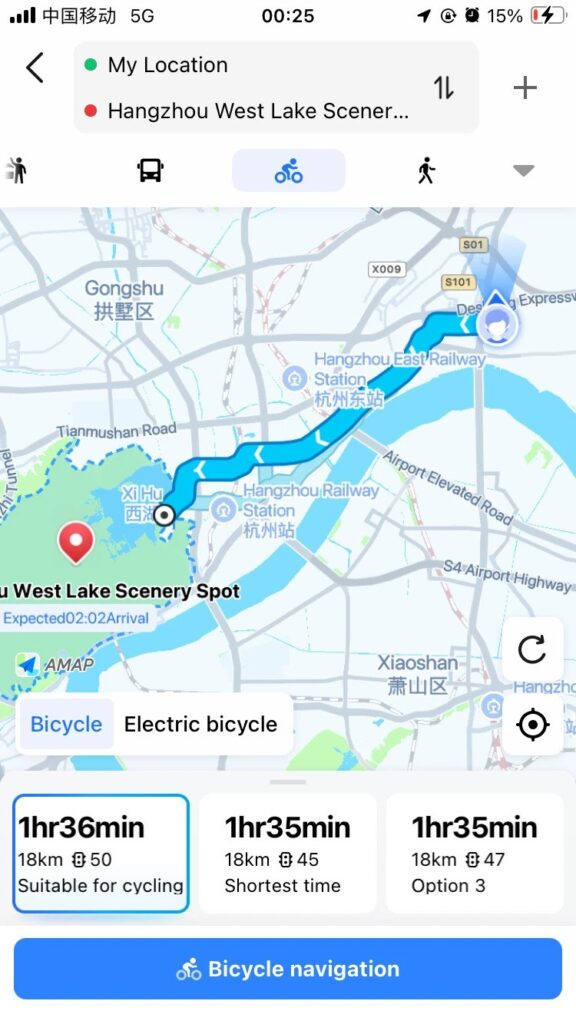
A few things I like about it Amap:
- Its coverage is strong across China, from major cities to smaller towns and even many rural areas.
- Its public transit directions are especially useful. It shows roughly how long the trip will take, when the next bus is coming, and which subway exit to use.
- You can search for nearby restaurants, hotels, attractions, and things to do.
- You can also use it to book rides, which is often easier, and sometimes cheaper, than trying to hail a regular taxi.
Pro-tip: you can use Amap without creating an account. But if you want to book rides through it, you’ll need to create an account with a phone number first.
Apple Maps: If you use an iPhone, Apple Maps can also work as a backup in China. Basic directions usually work well, and in China, Apple Maps uses map data from Gaode/AutoNavi.
But for ride-hailing and local features, using Amap directly is still more convenient, which is why I recommend it most as a reliable map app.
I cover how to use Amap/Gaode Maps in detail in a separate guide.
DiDi: A Ride-Hailing Backup if Amap Doesn’t Work
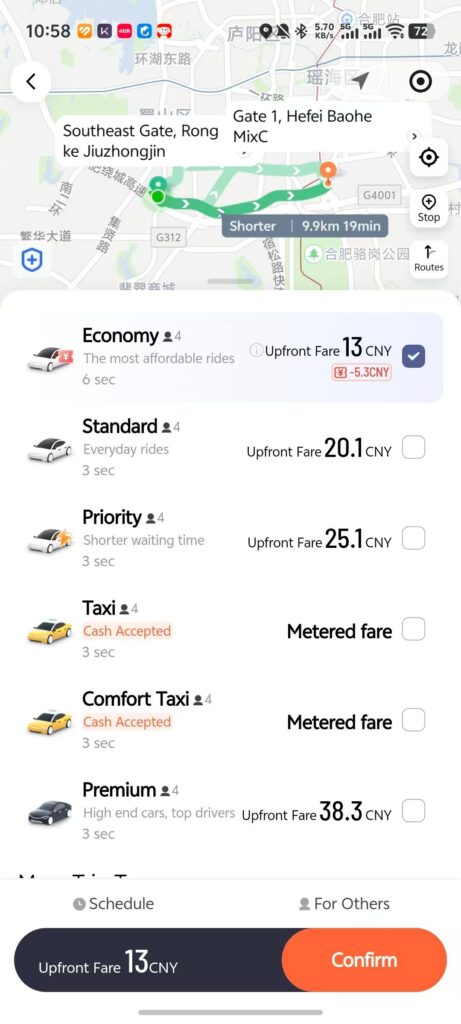
Ride-hailing in China is convenient when you’re going somewhere a little farther, when you’re too tired to walk to the nearest station, or when public transit is crowded and involves several transfers.
It’s usually pretty affordable too, especially if you’re traveling with one or two other people.
However, try to avoid morning and evening rush hour if you can, because traffic can be very heavy in China’s big cities.
In most cases, I recommend using the ride-hailing feature in Amap. Since it’s built into the same app you use for navigation, you can look up your destination, check the route, and book a ride all in one place.
Unfortunately Amap doesn’t accept phone numbers from every country or region, so some travelers may not be able to register. In that case, DiDi (like Uber in China) is a great backup because:
- You can use it in English and enter addresses in English.
- You can choose different ride types.
- You can pay with WeChat Pay or Alipay.
- It gives you more transparency around the route, fare, and pickup details.
When you get in the car, just tell the driver the last four digits of your phone number and then you don’t have to talk much during the rest of the ride. If you’re worried about pronunciation, type the numbers on your phone ahead of time and just show the driver your screen.
When you arrive at your destination, you can just get out of the car, and depending on your settings, the app will either charge you automatically or let you pay afterward.
“DiDi” Mini Program (recommended)
If you don’t want to download the DiDi app separately, search for the “DiDi” Mini Program in WeChat or Alipay. It has an English version, and you can just log in with your WeChat or Alipay account.
 “DiDi” Mini Program
 “DiDi” Mini Program
eSIM: Stay Connected in China
When you’re traveling in China, many everyday tasks need an internet connection, so you may use quite a bit of data, which can get expensive if you’re using international roaming from your carrier back home.
As I said before, many of the apps you likely use back home won’t work the same in China. One of the easiest ways around this is to buy and set up an eSIM before your trip.
Airalo (a brand of eSIM) can be a good option because:
- You can choose a plan based on how long you’re staying and how much data you need.
- It routes your data through roaming outside mainland China, which can help you access apps and websites that are normally blocked there.
- It’s fairly easy to set up.
I usually recommend buying a Hong Kong eSIM. Because Hong Kong is close to mainland China, a Hong Kong eSIM can often give you a faster, more stable connection.
For a short trip (around 15 days or less) a modest data plan is usually enough as long as you’re not streaming lots of video. Just make sure you buy and set it up before you arrive.
Alternative: VPN or Proxy Service
If you watch a lot of videos or use your phone heavily, you can burn through your eSIM data quickly. Most hotels in China have Wi-Fi, but once you connect to regular Chinese Wi-Fi, apps like WhatsApp, Instagram, Google services, and YouTube will stop working. In that case, using Wi-Fi with a VPN or proxy service can make more sense.
There are plenty of VPN options out there, but you do need to be careful. In my experience, some big-name VPNs you may already know, such as ExpressVPN, NordVPN, and Surfshark, don’t work in China most of the time.
You’ll find plenty of articles online calling them the “best VPNs for China,” but a lot of those lists seem to be written more for affiliate commissions than for travelers. As someone based in China, I have a pretty good idea of which tools actually work here. Here are the options I’d consider for your trip:
Just My Socks is a proxy service launched by BandwagonHost, a cloud hosting company, in 2018. It’s popular among users in China because it’s affordable and fast. Technically, Just My Socks is not a VPN. It can help you access blocked websites and apps, but it doesn’t encrypt all your internet traffic the way a traditional VPN does.
It uses CN2 GIA routes (a type of premium China connection) which tends to work well from China. In my experience, web pages load quickly, the connection is responsive, and the price is reasonable (the cheapest plan is around $5.80 per month).
The first time you visit the Just My Socks website, you may wonder if it’s trustworthy because the site is very basic, but the plain design doesn’t mean the service doesn’t work.
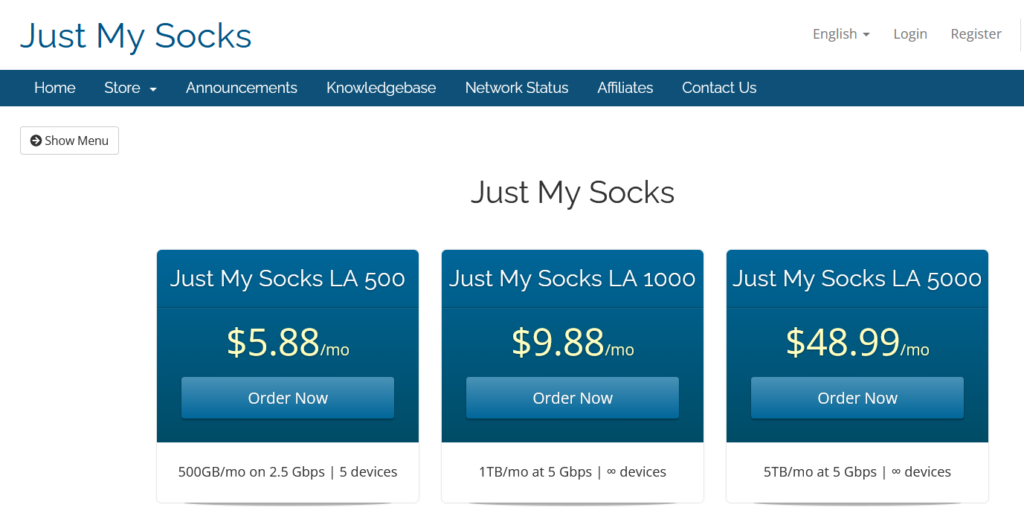
The company doesn’t rely on marketing to attract users and most people find out about it through word of mouth, so they don’t prioritize the aesthetic.
For most travelers, the ‘Los Angeles’ server plan should be enough. If you want a faster connection, you can also consider the ‘Hong Kong’ server plan, which costs around $8 per month.
Just My Socks offers a 7-day money-back guarantee if you’re not happy with your purchase. However, you need to request it within 7 days of creating your account, and your data use must not have exceeded 10% of your monthly allowance.
Astrill is one of the few VPNs that works reliably in China. It also encrypts your internet traffic, so it’s more secure than a simple proxy service.
The downside is Astrill is expensive (its monthly plan costs around $30), so unless security and privacy are especially important to you, Astrill wouldn’t be my first choice for most travelers. If you’re staying longer and mostly just want access to blocked websites and apps, a cheaper proxy service may be a better value.
LetsVPN is another tool I’ve personally tested in China. Although it calls itself a VPN, it isn’t really the same thing as a traditional VPN, and I wouldn’t recommend it if your main concern is privacy.
For a few years, LetsVPN was fairly stable and fast. But in recent months, it has become noticeably less reliable, if it even works at all. My guess is that as LetsVPN became more popular, it started attracting more regulatory attention. At the time of writing (April 2026), the service is still having disruptions, so I don’t recommend it right now. I’ll keep an eye on it, and if it becomes stable again, I’ll update this guide.
Tip for Longer Trips
- An eSIM is the easiest option for short trips, but if you’re staying in China for more than two weeks, a local SIM card plus a reliable VPN or proxy service is usually a better option than buying more eSIM data.
- You can buy a local SIM card at the airport when you arrive and prices are usually reasonable. In major Chinese cities, you’ll find China Mobile or China Telecom counters in the arrivals hall.
Translation and AI Tools
Translation tools: Google Translate or Microsoft Translator
English isn’t widely spoken in many parts of China, so a good translation tool is essential.
Google Translate is excellent, but it doesn’t work properly in China without a workaround. If your eSIM or VPN gives you normal access to Google services, Google Translate is my top pick. You can use it to translate documents, write questions you want to ask, read menus, talk with locals, and handle small problems during your trip.
A few reasons I like it:
- It’s fast and easy to use.
- You can type or speak what you want to say, then show the Chinese translation to whoever you’re talking to.
- Its camera translation feature is great for translating signs, menus, and documents.
Pro-tip: download the offline Chinese language pack before your trip for when your signal is weak and you urgently need a translation.
If you can’t access Google Translate, Microsoft Translator is a good alternative. It has similar features and works well for most everyday travel situations, such as asking for directions, reading menus, and having basic conversations.
AI tools: Deepseek or Qwen
In addition to translation apps, it’s helpful to have an AI tool ready for additional language help or travel questions. ChatGPT is useful if you have reliable access to it, but it usually isn’t directly accessible in China because of internet restrictions.
For that reason, I recommend having a backup option, such as Qwen or DeepSeek, both of which are China-based and free to use.
Google Translate and Microsoft Translator are better when you just need a direct translation, but AI tools can help explain what something means or give you more context.
For example, you might see a museum exhibit and want to understand its historical background or you might not understand what a dish on a restaurant menu is. In those situations, take a photo, upload it to an AI tool, and ask it to explain the meaning, background, or ingredients in plain English.
Read More: How to Travel in China Without Speaking Any Chinese
Trip.com: Hotels, Trains, Flights, and Attraction Tickets
Trip.com is one of the most useful booking sites for traveling in China. It’s not just for hotels, either—you can also use it to book trains, flights, attraction tickets, tours, and car rentals. For most travelers, it covers almost everything you’ll need to book for a trip to China.
A few reasons I recommend Trip.com:
- Both the website and app are available in English.
- Because it’s so widely used in China, it usually has more hotel listings, attraction tickets, and local activities than many overseas booking sites.
- The app and website are easy to navigate, which makes booking much simpler than trying to do everything through WeChat Mini Programs or Chinese-language platforms.
You may be used to booking hotels on sites like Booking.com, but in my experience, they’re not nearly as useful in China as Trip.com, which has more hotel listings and often better prices too.
One reason is that Trip.com is so widely used in China is that many hotels and travel companies depend on it for bookings. To get better placement on Trip.com, some businesses agree to offer their lowest prices on the platform, and some even have exclusive arrangements and only sell through Trip.com. This is the case for the hotel I run in Guangzhou.
This is especially true in smaller cities with fewer international tourists, where some hotel owners may not even have heard of Booking.com, or it may never have occurred to them to list their rooms there. You can certainly still find hotels through Booking.com, but prices may be higher, and you may miss some better local options.
Trip.com also makes booking attraction tickets much easier. You can book tickets through WeChat Mini Programs, but most of them are in Chinese. You can use WeChat’s translation feature to translate the page into English, but it isn’t always easy to understand and it can also mess up the page layout.
Trip.com is much more straightforward for attraction tickets. The information in English is usually clearer, and you can search, pay for, and confirm your booking easily.
The same is true for train tickets. China’s official train ticket platform, 12306, does have an English version, but it’s not very easy to use, especially if it’s your first time buying train tickets in China. Trip.com has more English guidance and clearer explanations for bookings, refunds, and change policies.
Trip.com also offers a paid “priority ticketing” service. If you’re traveling with a group, or if train tickets are hard to get, this feature can be useful. Otherwise, I wouldn’t pay extra for it.
Railway 12306: China’s Official Train Ticket App
As mentioned above, Railway 12306 is China’s official platform for booking train tickets for routes across mainland China. But like I said, I’d use it only as a backup to Trip.com, especially if it’s your first time booking train tickets in China.
Booking through Railway 12306 is more complicated. It does have an English version, but some parts are not fully translated, and the booking, refund, and change rules are not always easy to understand. Once you understand the process and buy your first ticket, it gets much easier, but the first time can be confusing.
Some travelers also complain that features are missing or harder to use in the English version of 12306. For example, some users have said they couldn’t use the waitlist feature in the English version, which can be very useful when regular tickets are sold out, especially on popular routes or during holidays.
Railway 12306 also has a WeChat Mini Program, but it has fewer features and no English version. Overall, Railway 12306 is worth knowing about because it’s the official platform, but if you want the easiest booking experience in English, I recommend using Trip.com for train tickets.
Meituan: Food Delivery, Restaurant Deals, and Local Services
If you want to eat and explore like a local in China, Meituan is another good app to have for your trip. China may already seem affordable to you, but Meituan can make
food delivery, restaurant deals, and all kinds of local services even cheaper.
You can use Meituan to buy restaurant meal deals and dine-in discounts, and it’s one of the best ways to discover small local restaurants you might otherwise miss. The ratings can help you decide what restaurants are recommended by locals and the deals are often better than what you’d get when ordering directly at the restaurant.
Beyond food, you can use Meituan to book things like spas, massages, gyms, family activities, kids’ play centers, and even health checkups. Some gyms sell day passes through Meituan, which can be useful if you want to work out during a short trip.
I recommend searching for the “Meituan” Mini Program in WeChat instead of downloading the standalone Meituan app, because it doesn’t have an English version. The Mini Program does almost everything the full app does, and even though the interface is in Chinese, WeChat’s translation feature makes it easy to use in English.
The biggest hassle with Meituan is registration, because you need a phone number to register, especially for delivery orders, where the courier may need to contact you. Meituan doesn’t work reliably with phone numbers from some countries, so you may not receive the verification code. In this case, you can contact customer support and they will ask you to verify your identity then help you finish signing up.
The easiest option, of course, is to get a local SIM card. At airports in major Chinese cities, you can find China Mobile or China Telecom counters in the arrivals hall, and the prices are reasonable. For example, in some cities, a short-term China Mobile plan costs around $18 for 15 days.
Once you’re registered, you can choose what you want to order or book and pay directly with WeChat Pay or Alipay.
Read More: How to Use Meituan: A Guide to Ordering Food Delivery in China
Dianping: China’s Yelp
Dianping is like China’s version of Yelp, but with more restaurant details, meal deals, and discounts. You can use it to look up places to eat, read reviews, and see what locals recommend. In that sense, it can also work as an alternative to Meituan, especially if you mostly just want to find places to eat. To access it, just search for “Dianping” in WeChat Mini Programs.
For international travelers, Dianping’s interface may feel a little easier to use than Meituan’s, but it isn’t nearly as popular among locals for food delivery, restaurant deals, and everyday services because Meituan has more listings. For most travelers, Meituan is enough.
Final Tips for Setting Up Your China Travel Apps
China is an amazing place to travel, but the tech logistics are different from many other countries. Between the language barrier, blocked apps, and China’s own set of popular apps, a little preparation makes a big difference. This is also why I suggest setting up the key apps before your trip, not after you land.
Some of the apps in this guide are essential for traveling in China and others are just nice to have, depending on how you like to travel. They can help you pay for things, get around, order food, book tickets, communicate with locals, and experience more of everyday life in China. At first, they may seem a little confusing, but once you start using them, they’re usually easier than they look.
Have questions about any of these apps, or need help using them? Leave a comment or contact me directly and I’ll do my best to help.