How to Use Amap (Gaode) in China – A Traveler’s Guide
Amap is one of the most popular map apps in China, and it does much more than basic navigation. You can use it to check live traffic, plan bus and subway routes, find places on the map, and even call a ride. If you’re traveling in China, it’s one of the most useful apps to have on your phone during your trip. This guide explains how to set up and start using Amap.
1. Download Amap Before Your Trip
If possible, download Amap before you arrive in China, especially if you use Android.
You can find it by searching for Amap or Gaode Map in the App Store or Google Play.
You can also download it from Amap’s official website at: https://www.amapint.com/en
If you wait until you’re already in China to download it, Google Play will not work because of internet restrictions. You may be able to access it with international roaming, a VPN, or an overseas eSIM, but those options generally cost extra.
Change Your Language
After you install the app, Amap will either match your phone’s language settings or ask you to choose a language the first time you open it.
If you skip that step, you can change it later in the app using these instructions:
- Open Amap and tap Me
- Tap Settings in the top right
- Go to Language Settings
- Choose English (or your preferred language)
- Restart the app so the language resets
If you need the app in English, I recommend downloading it before coming to China. If you wait until after you’re in the country and download it from a Chinese app store, it may not have the option to switch languages.
Good to know: Amap supports 14 languages, including Spanish, French, German, Thai, Japanese, Korean, Russian, and Arabic.
Is Amap Available Entirely in English?
Mostly, but not entirely.
Once you switch the app to English, most of the interface will appear in English, including the main menu, navigation prompts, and major landmarks. The names of some places and user reviews may still show up in Chinese.
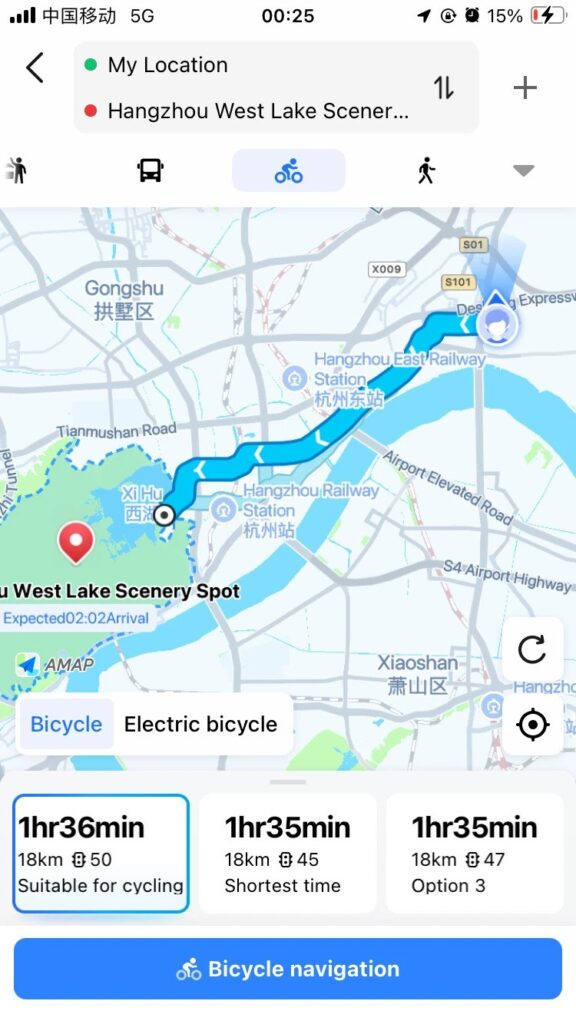
Voice navigation is also available in multiple languages. If you use Amap for driving, the spoken directions can be in your selected language, but street and place names are often still said in Chinese.
2. Create an Account
Optional, but recommended.
You don’t need an account for basic things on the app like searching for places or getting directions. But you’ll need to sign in if you want to save places (like your hotel or the airport), save routes, or book rides through Amap.
You can still use most of Amap if you sign in with WeChat, Alipay, or email. But if you want to use ride-hailing, you’ll need to link a phone number.
Another benefit of signing in is that your saved places can sync across devices. For example, you can save places on Amap’s desktop site and pull them up later in the app with the same account. That makes trip planning much easier.
To create an account:
- On iPhone: you can sign up with a phone number or email, or sign in with your Apple ID.
- On Android: you can sign up with a phone number or email.
Amap works with Chinese phone numbers and some overseas numbers, including ones from: Hong Kong, Macau, Taiwan, Singapore, Malaysia, Japan, South Korea, Thailand, Vietnam, Indonesia, the Philippines, Cambodia, Mexico, Australia, New Zealand, Kazakhstan, and Uzbekistan.
As of April 2026, U.S. and U.K. phone numbers are not supported.
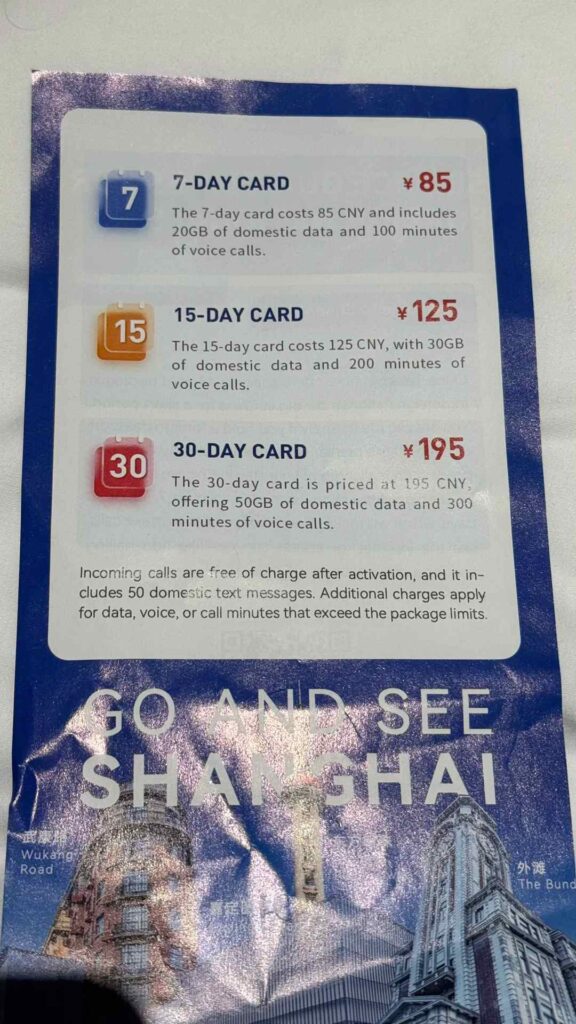
If your phone number doesn’t work for registering, the easiest option is to sign up with an email instead. You can also buy a local Chinese SIM card after you arrive, which are available at airports in China and not expensive.
If you sign up with an email address and don’t get the verification code, check your spam folder.
If you’ll be staying in China for a while, I do recommend getting a Chinese SIM card. It’s usually much cheaper than international roaming, and airport SIM cards are easy to find. Plans are usually less than $30 a month, and short-term options can be even cheaper (around 12$ for 7 days).
Read More: Do You Need a Chinese Phone Number When Traveling to China?
3. Download Offline Maps
Optional, but highly recommended.
If you can, download offline maps while you’re on Wi-Fi or before your trip. That way, you’ll still be able to use the map if you lose your connection or have issues with your SIM card. You may never end up needing it, but it’s good to have as a backup.
To download offline maps in the app follow these steps:
Me → Offline Maps → Select a city or province → Download → Turn on auto-update (for weekly map refreshes.)
Once the map is downloaded, you can use basic navigation and search for places even without an internet connection.
4. Search for Places
Amap can recognize many place names in English and pinyin, especially major tourist attractions.
For example:
Hangzhou West Lake
or
Hangzhou Xihu
In many cases, Amap will also show information about the place in both Chinese and English, so you can confirm that you’ve found the right place.
Once you’ve found your destination, you can also search for nearby restaurants, coffee shops, restrooms, ATMs, and convenience stores. You can also see ratings and prices.
5. Choose How to Get There
Once you’ve entered your destination, Amap will show you different ways to get there at the top of the screen, such as driving, public transit, walking, biking, and ride-hailing. You can switch between them easily, and Amap will update the time and distance.
Public transit
Amap gives detailed bus and subway directions, including transfers. You can see which line to take, how many stops you have, and when your bus or train is due.
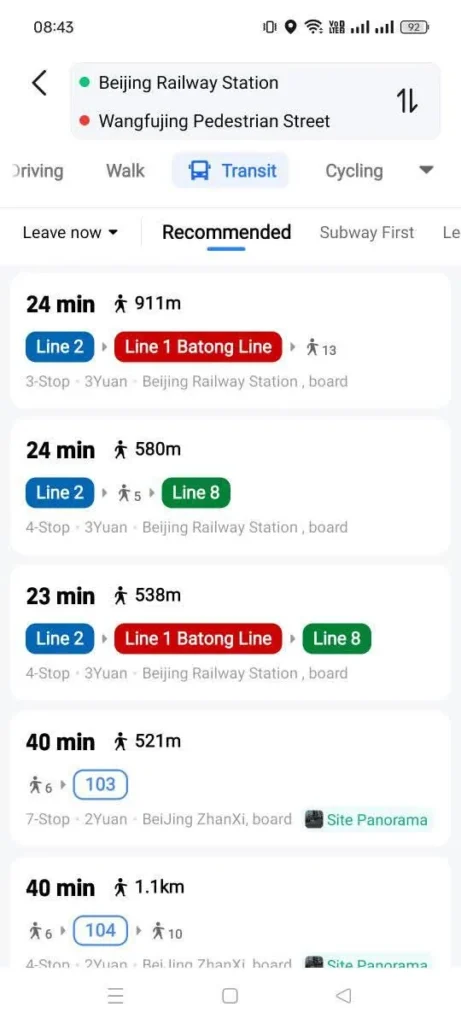
For subway routes, it also shows station names and exit information. In some cities, you can even use Amap to purchase your fare while you’re on the bus or subway. If that’s available where you are, the app will guide you through buying a ticket and paying with your linked payment method.
Another useful feature is the stop reminder. When your stop is coming up, your phone will vibrate to let you know, which is helpful if you don’t speak Chinese and the announcements onboard are hard to follow.
Walking
Amap also has good walking directions. It highlights sidewalks, pedestrian paths, and other walking routes. As you walk, it gives directions for where to turn and when to use a bridge or underpass. And in more confusing areas, it will show visual cues to help you stay on the route.
Biking
Amap can also plan bike and e-bike routes. It shows bike routes and elevation changes, which is helpful if you want to get around the city on bikes.
In some places, Amap also connects with platforms to rent shared bikes, so you can see available bikes near you on the map and unlock them by scanning a code.
Driving
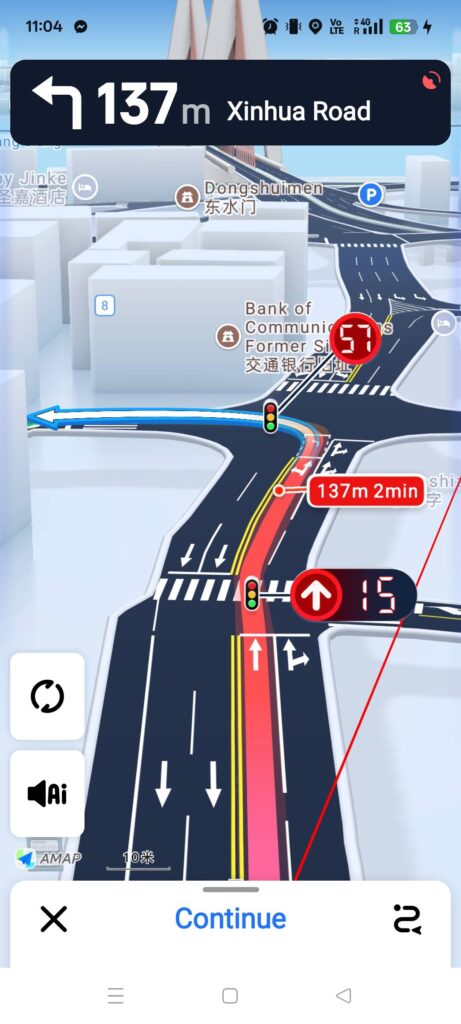
If you’re driving, Amap shows route options with estimated travel time, distance, and traffic. Its data updates regularly, including with faster routes to avoid congestion. While you’re navigating, it even shows traffic light countdowns and lane guidance.
Ride-hailing
Ride-hailing is a good transportation option in China, and I suggest using it during your trip, the prices are very reasonable.
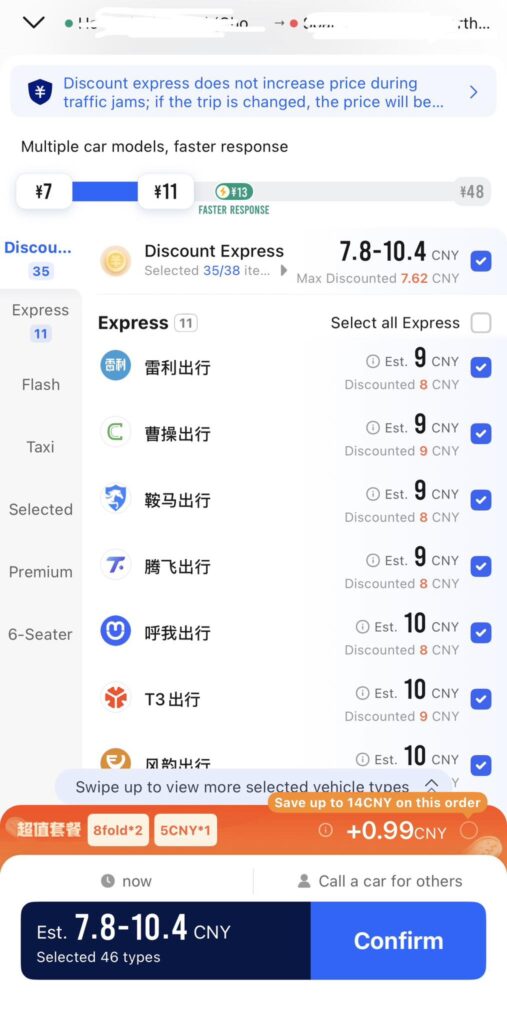
If you tap the ride-hailing option, Amap will take you to the booking screen, where you can request a ride. I’ll go over that in more detail in the next section.
Whichever transportation option you choose, Amap will show you the estimated travel time, and it’s usually pretty accurate.
By default, Amap uses your current location as the starting point, so make sure the app has location access.
You can also change the starting point manually. For example, if you’re going from your hotel to an attraction, you can set your hotel as the starting point.
Once you’ve picked an option, tap Go and follow the route.
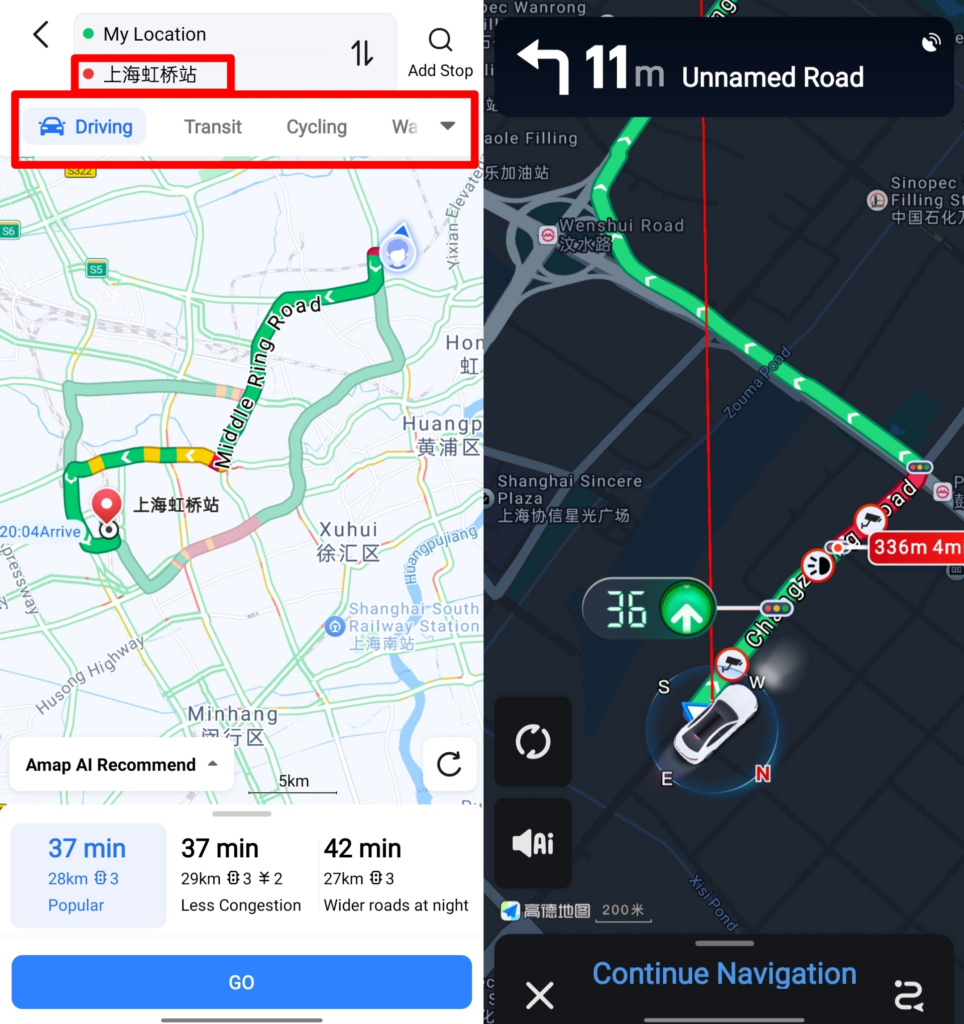
While you’re on the way, Amap will keep updating your route based on live conditions. For example, if there’s heavy traffic ahead, it will suggest a faster route.
6. Booking Rides with Amap
Ride-hailing is one of the most useful parts of Amap and a commonly used option for both visitors and locals. It pulls in cars from multiple platforms, so you get more options, and prices are often lower than a regular taxi. Booking rides through Amap is especially helpful if you don’t speak Chinese, as you can get to your destination without having to talk to the driver at all.
Once you’ve entered your destination, tap the ride-hailing option. Amap will show the estimated pickup time and fare for your trip. If everything looks good, tap Confirm to request the ride.
Pro-tip: Amap offers several ride categories, including economy, regular taxis, selected rides, premium and 6-seater vehicles. Higher-end options cost more, so choose the one that fits your needs.
Add a payment method
The first time you use ride-hailing, Amap will ask you to add a payment method. You can link WeChat Pay or Alipay.
You’ll see two payment options: automatic payment after the ride, or manual payment in the app. For most travelers, automatic payment is the easiest option.
Meeting your driver
Once your ride is accepted, the app will show the driver’s name, license plate, car model, and estimated arrival time. The ride screen is in English, so it’s easy to follow.
Wait at the pickup point shown in the app, and stand somewhere the driver can easily spot you. Usually they will find you without any problem, but if you don’t see the car, look around nearby, because usually the driver is close by.
If you don’t speak Chinese, avoid booking from a crowded street or a confusing pickup spot. Once you’ve booked the ride, try to stay in one spot to avoid any confusion with the driver. Drivers will wait about five minutes without charging extra. After that, the driver has the right to cancel the ride, though you can also pay for extra wait time.
If the driver can’t find you, they may call to ask where you are. If you don’t speak Chinese, the easiest option is to send a message in the app saying:
抱歉,我不会说中文,也找不到您。请取消行程。 (Sorry, I don’t speak Chinese and I can’t find you. Please cancel the ride.)
Then move to an easier pickup spot and book again, which is usually easier than trying to sort things out over the phone.
Once you’re in the car, the driver will ask for the last four digits of your phone number so they can confirm the ride in Amap. Just tell the driver the numbers, or show them on your phone.
When the ride ends
If you’ve set up automatic payments, the fare will be charged automatically through your linked payment method, so you won’t need cash. You can get a full fare breakdown in the app, including charges for distance and time, so you can see exactly what you paid for.
You don’t need to stay in the car to wait for the payment to go through. Even if you didn’t turn on auto-pay, you can still get out first and pay later in the app.
10. Amap vs. Other Map Apps
Amap vs. Baidu Maps
Baidu Maps is the other popular map app in China. Like Amap, it has good coverage across the country, showing cities, smaller towns, roads, and local businesses.
Both apps are very good, and most travelers would be fine with either one. Most locals just use one or the other out of habit. I personally prefer Amap because the interface is more intuitive.
Amap vs. DiDi
DiDi is another alternative, but unlike Amap, it’s just for booking rides. Amap is more useful for getting around because it also includes directions, transit planning, and other travel tools. It also pulls from more ride-hailing platforms, which usually means more vehicle options and better prices.
Amap vs. Google Maps
I wouldn’t recommend using Google Maps in China.
For one thing, you’ll need international roaming, a VPN, or an overseas eSIM to use it reliably. Second, Google left the market in China a long time ago, so its map data is much less complete.
You may also see roads that don’t match what’s actually there, businesses that have already closed, or locations that are off by several hundred meters. Google Maps also isn’t reliable for live traffic in China, which makes it much less useful for navigation and avoiding traffic.
Amap vs. Apple Maps
iPhone users may want to use Apple Maps because it works in English and doesn’t require installing another app. In mainland China, its map data comes from Amap, so the information is generally accurate.
That said, Apple Maps is also more limited. It doesn’t support public transit directions, and its ride-hailing option runs through Amap anyway. If you want the best all-around option, Amap is still the better choice.
Final thoughts
If you’re visiting China, Amap is one of the most useful apps you can download. You can use it to find places to eat, book rides, and check public transit, all in one app.
There’s a bit of setup for registration and payment, but once you’ve done that, the app makes getting around China much easier.
Read more:
Essential Apps you need for Traveling in China
A Guide to Ordering Food Delivery in China
Essential Things to Do Before Traveling to China