How to Travel in China Without Speaking Any Chinese: Translation Apps + Simple Communication Tricks
If you’re traveling in China, the language barrier may be one of your biggest worries, and understandably so. Not being able to easily order food, buy tickets, or ask for directions adds an additional layer of stress to a vacation.
As someone who lives in China, I’ll admit that English isn’t widely used in everyday situations here. Many people do study English in schools, but don’t get much real-life practice. So they may understand some words, but feel uncomfortable speaking in the moment.
For this reason, you’ll often encounter people who don’t recognize even basic English words that travelers may assume are universal. It’s also important to remember cultural differences. You might feel like you’re being clear, while the other person doesn’t get it right away.
In major cities, especially areas with more universities, international businesses, or foreign visitors, you’ll have better luck finding younger people who understand some English. But overall, comfortable English conversation still isn’t common.
The good news is that with a smartphone and a few simple tricks, you can get around just fine, even outside the big cities. Here I’ll share some strategies that work in practice when traveling.
How to Communicate in English in China (Even if Their English is Limited)
Most people won’t have the English level for a full conversation. But many younger people can understand basic words and common phrases, even if they can’t follow long sentences. So it’s worth trying English, but the most important rule is to keep it simple. Here are some tips:
- One keyword often works better than a full sentence.
- Avoid complicated sentences.
- Skip jokes or wordplay.
- Use gestures, pointing, and a friendly smile (but don’t overdo politeness).
Example:
❌ “Excuse me, do you know where the toilets are located?”
✅ “Restroom?” (plus pointing or a questioning gesture)
Other No-Words Ways to Communicate
These sound basic, but they work surprisingly well:
- Point to what someone else is eating and say “this/that.”
- Show a photo of what you want to order.
- Use your fingers for numbers (1, 2, 3…).
- Nod, smile, and stay patient, and most of the time it goes smoothly.
A Few Basic Phrases Worth Knowing
You don’t need a long list. These are enough, and you’ll actually use them:
| English | Chinese | Pinyin | When to use |
| Hello | 你好 | nǐ hǎo | Greeting/starting a conversation |
| Thank you | 谢谢 | xiè xie | Showing appreciation |
| Yes | 是的 | shì | To affirm or say “yes” |
| No | 没有 | méiyǒu | To negate or say “no” (for “don’t have” or “didn’t happen”) |
| How much? | 多少钱 | duō shao qián | Shopping |
| No, thanks | 不要 | bù yào | Declining things |
| I don’t understand | 我听不懂 | wǒ tīng bù dǒng | When you don’t comprehend what was said |
| I am a strict vegetarian | 我是严格的素食主义者 | wǒ shì yángé de sùshí zhǔyì zhě | When ordering food |
| This one | 这个 | zhè ge | pointting out your choice |
| Bill please | 买单 | mǎi dān | When asking for the bill at a restaurant |
For Food
| English | Chinese | Pinyin |
|---|---|---|
| Not spicy | 不要辣 | bù yào là |
| No meat | 不要肉 | bù yào ròu |
| Allergic | 过敏 | guò mǐn |
For Emergencies
| English | Chinese | Pinyin |
|---|---|---|
| Help | 帮忙 | bāng máng |
| Hospital | 医院 | yī yuàn |
Pro tip: Screenshot this table and keep it on your phone.
Translation Apps + AI Tools: Get the Info You Actually Need
Once you land in China, a reliable translation app isn’t optional, but a travel essential if you don’t speak Chinese.
In China, Google Translate generally won’t work unless you use a workaround, like a VPN, an overseas eSIM, or international roaming. That’s why, for most travelers, Microsoft Translator is the easiest choice. It’s well-rounded: you get text translation, camera translation (perfect for menus and street signs), and even conversation mode for real-time voice translation.
That said, if you can use Google Translate reliably with your setup, I personally prefer it. I’ve tested both, and Google Translate covers everything Microsoft Translator does, but it’s smoother and easier to use.
Why Translation Apps Can Still Leave You Confused
Even with good apps, traditional translation tools can be hit-or-miss in real-life situations when communicating in China. They’re usually fine for simple things, but once the wording gets more complex, mistakes become more common.
Chinese is structured much differently from English, and a lot of meaning depends on cultural context. Tone, implied meaning, and local slang don’t always survive direct translation; so you end up with English that’s technically translated, but doesn’t actually match what the person is trying to say (or worse, it gives you the wrong impression).
When Translation Apps Aren’t Enough, Use AI to Explain
If Microsoft Translator isn’t cutting it, AI tools are really helpful, like ChatGPT or Google Gemini. But since those may not be accessible in China without a workaround, I recommend having a China-friendly backup: DeepSeek (Free).
Based on what I’ve tested, AI explanations usually sound more natural, and more importantly, they do a better job explaining the meaning behind the words. Even when you run into local slang, AI is often much better at breaking it down in a way that actually makes sense.
For example, if you’re reading a menu at a restaurant or trying to understand a sign at a tourist site, you can take a photo and upload it to an AI tool. It can read the text in the image and explain it in English.
Just remember, for the sake of privacy, avoid uploading anything sensitive, like passport details, bank cards, or payment screens (any screenshot/photo showing a payment QR code), verification codes, or transaction info.
To get better results, add one clear instruction like:
“Please explain this in simple, easy-to-understand English. Write it in a way most Americans would easily understand.”
When you give instructions like this, AI tends to use clearer, more straightforward English, which makes it much easier to judge what something means and make a more confident decision.
For Longer back-and-forth conversations, use WeChat
For anything that involves real discussion, like planning with a tour guide or coordinating with a hotel front desk, WeChat is usually the easiest way. It can translate messages smoothly so both sides can just write in their own language. (I’ll show you exactly how to use it in the next section.)
Use Screen Translate First, Then Ask AI to Explain it Clearly
Most Android phones and iPhones now have built-in screen translation. When you’re on the street, at tourist spots, or in restaurants, if you run into Chinese you can’t read, just take a photo and have your phone translate it. It’s fast, convenient, and always available.
When it works best
Let’s say you’re using a restaurant app and the menu is fully in Chinese. Screen translation can convert the whole page into English right away. Even if it’s not perfect, it’s usually enough to understand the categories of dishes and what you might be interested in.
The limitation: it’s often too literal
Phone translation doesn’t always have the same level of understanding as AI. It can be very literal, so you might see the translation but still not be clear on what a dish actually is, how it’s flavored, or how it’s cooked.
This is where AI tools can become helpful.
What to send to AI
Use either:
- A screenshot of the menu, or
- A photo of a paper menu at the restaurant.
Then add one clear prompt. For example:
“Explain what each dish is in plain English. Include the main ingredients, how it’s cooked, and whether it’s spicy or sweet.”
Usually, AI will break each dish down in a way that’s actually useful, like:
- What the main ingredients are
- How it’s cooked (stir-fried, braised, steamed, grilled, etc.)
- Whether the flavor leans spicy, sweet, sour, or savory
- Possible common allergens (seafood, peanuts, sesame, dairy, etc.)
- Whether it might include organ meats
- What it’s most similar to, based on foods you might already know
That makes it much easier to decide: “Yes, I’d order that,” or “Nope, not for me.”
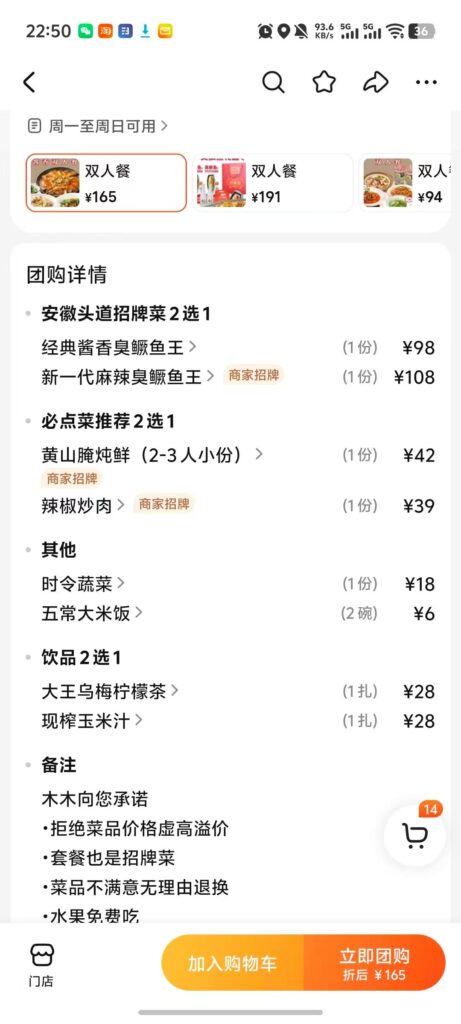
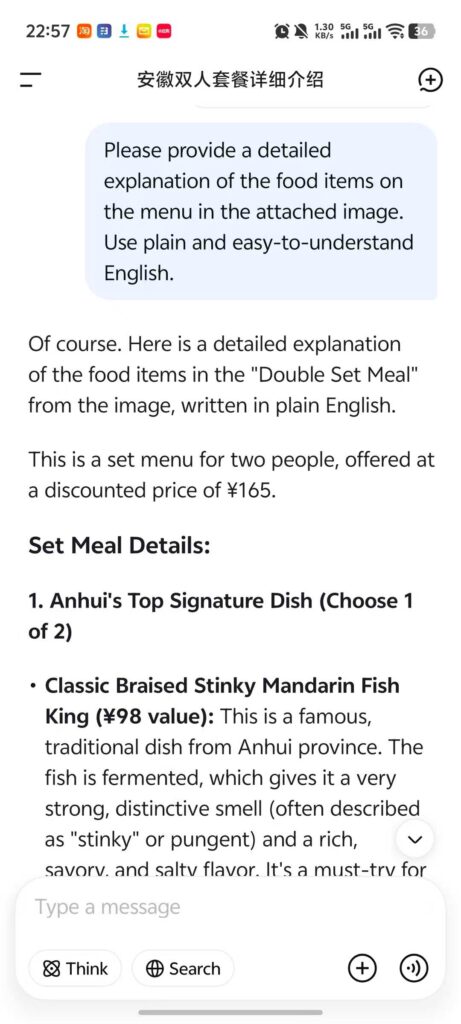
I’ve tried this with DeepSeek, and for restaurant menus inside ordering apps, the explanations were detailed enough that I felt like I knew what I was getting before ordering.
The screenshot I sent to Deepseek:
Deepseek gave me the explanation:
This works for more than just food
The same method is great for Chinese text when you’re at:
- Scenic spots (signs and descriptions)
- Museums (exhibit panels)
- Memorial sites (introductions and historical notes)
If you don’t understand something, do the same thing as above:
take a photo → upload it to an AI tool → ask for a clear explanation.
It helps you understand the people or stories behind what you’re seeing, so your trip feels deeper, and not just “I took a picture and moved on.”
For example, I once photographed a farewell letter from a young soldier/revolutionary displayed at a memorial park in Hefei.
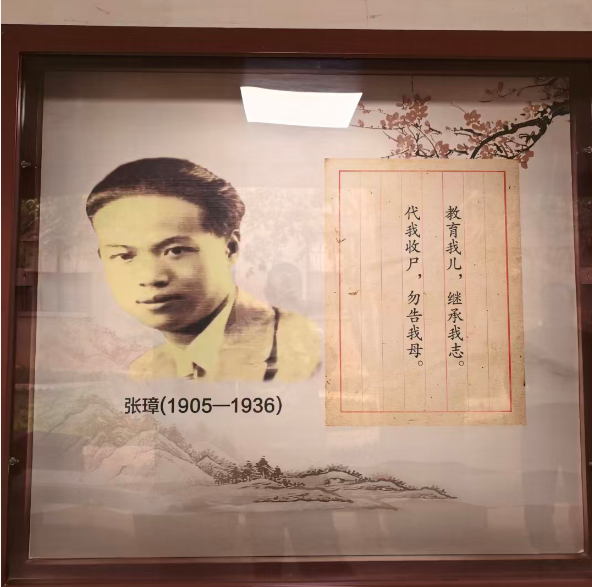
You can use a prompt on AI like:
“Help me understand what this text means. Explain it in plain English and summarize the tone and context.”
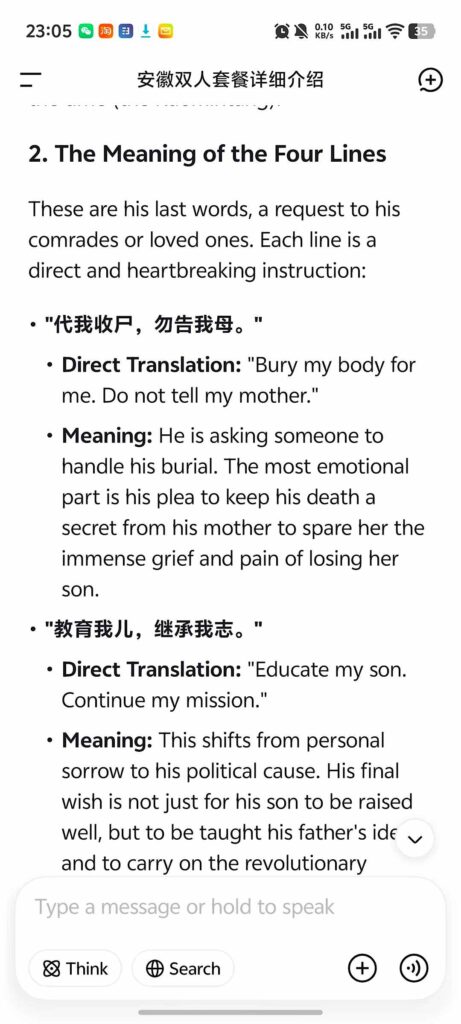
AI will usually explain the message clearly, and often helps you understand the emotion and implied meaning, not just the literal words.
DeepSeek’s explanation of the text in my image.
Small trick, big difference!
WeChat: A Key Tool in China
If you’re traveling in China, having WeChat is basically essential and will make your trip much easier. It’s the messaging app that almost everyone uses, and it’s also one of the most common ways to pay for things.
Like I mentioned earlier, WeChat is also good for longer, practical conversations, such as with your guide, hotel staff, or anyone else you might be trying to communicate with.
The chat window has built-in translation, and it’s easy to use. It helps you to talk with someone quickly and easily. You can focus on saying what you mean, and let the translation handle the rest.
1) WeChat Translation for Real Conversations
The basic flow
- Open WeChat and go to the chat with the person you’re talking to.
- Send a text or voice message in your own language.
- On their side, they can translate what you sent (especially helpful if you used voice).
- When they reply in Chinese, you translate their message the same way.
How to translate their messages
If they send Chinese text:
- Press and hold the message bubble.
- Tap Translate.
If they send a Chinese voice message:
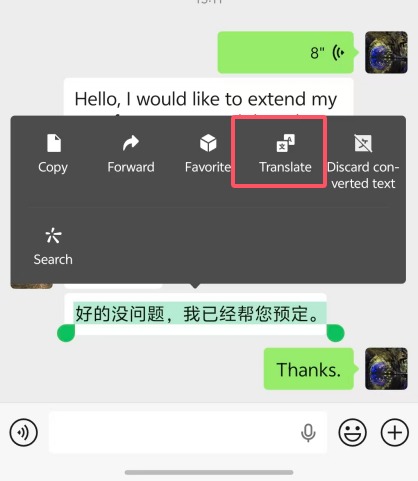
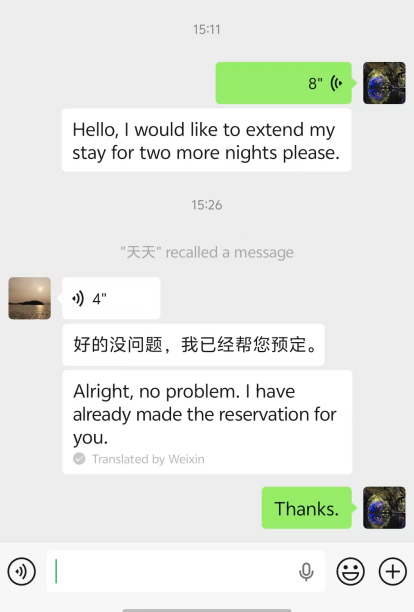
- Press and hold the voice message → tap Convert to Text.
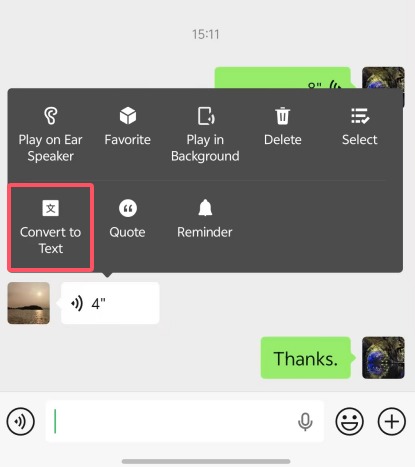
- Then press and hold the text → tap Translate.
Pro-tip: translate images in Chinese, too
Sometimes someone will send you a screenshot or photo with Chinese text. You can translate that as well:
- Open the image.
- Press and hold on it.
- Tap Translate.
Even if it’s not perfect, it’s usually enough to understand the main point.
Translation might not be WeChat’s most obvious feature, but it’s actually very useful while you’re traveling. And as mentioned before, you’ll need it anyway to pay for things.
2) Mini Program Translation: Turn an “All-Chinese” Screen Into English
WeChat isn’t just for texting and paying, it has a lot more to offer. Inside it are mini programs (lightweight apps that run inside WeChat), and many travelers don’t realize how useful they are.
In China, things like booking attraction tickets, reserving museum entry, or ordering food at a restaurant can often be done directly through WeChat mini programs.
And the convenient part is WeChat can translate an entire mini program interface. So if you open a mini program that’s only in Chinese (like a ticketing or ordering page), you can turn on translation and WeChat will display the entire interface in English.
For example, if you scan a QR code at a restaurant and the ordering screen is entirely in Chinese, try this:
1, Tap the “…” in the top-right corner.
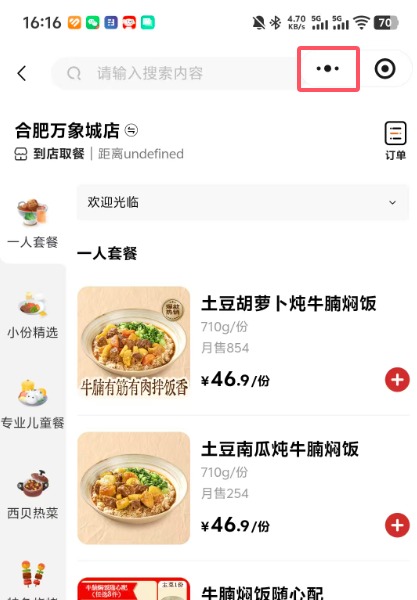
2, Choose Translate.
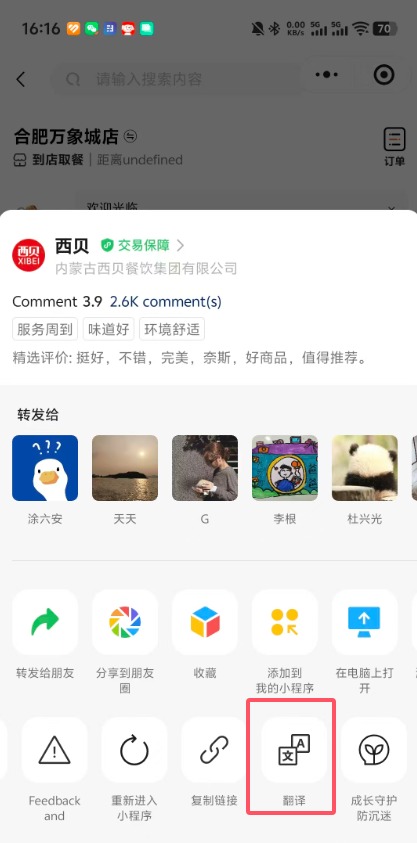
3, The mini program pages should show up in English.
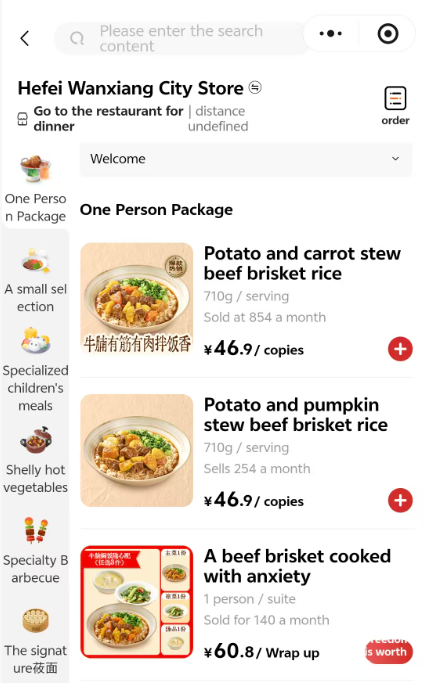
This will feel more manageable than trying to translate each thing by yourself.
Pro-tip: Services Like Didi + Meituan Often Work Inside WeChat Too
Common services like Didi (ride-hailing) and Meituan (food delivery and local services) also have mini programs inside WeChat. That means you may not need to download separate apps, and you can do things like get a ride or order food directly in WeChat.
And once you turn on WeChat’s translation, many mini programs will display an English interface (or at least translate most of the screen). This can be more convenient than using your phone’s full-screen translator, especially if you’re in a hurry.
Alipay: A Similar Backup Option
Alipay is very similar to WeChat. It supports mobile payments, mini programs, and it also has a very helpful built-in translation translation. Most of the time, WeChat alone is enough. But if you want extra peace of mind, it doesn’t hurt to install both WeChat and Alipay, just in case.
Real-Life Situations You’ll Actually Run Into
Reading a restaurant menu
A lot of restaurants in China let you order through a WeChat mini program. Usually you scan the QR code on the table, open the menu, and place your order, all while keeping translation turned on.
If there’s no mini program, they’ll usually have a paper menu. In that case, take a photo and use your phone’s built-in translation to get the basic idea. If the translation still feels unclear, use one of these two options:
- Use the menu photos (many places include pictures) and make your best guess.
- Upload the menu photo to an AI tool and ask for a plain-English explanation. You can also ask it to flag things like “might be spicy,” or whether it includes organ meats or seafood.
Keep in mind, Chinese dish names are not always literal. Sometimes the name doesn’t clearly tell you what the dish actually is, which is why AI explanations can be more useful than direct translation.
A Few Useful Chinese Characters (Just for Ordering Faster)
You don’t need to speak Chinese, but knowing these can help you make faster decisions when you’re ordering:
- 米饭 (mǐfàn) = rice
- 面 (miàn) = noodles
- 菜 (cài) = vegetables
- 鸡 (jī) = chicken
- 牛 (niú) = beef
- 羊 (yáng) = lamb
- 猪 (zhū) = pork
- 辣 (là) = spicy
- 豆腐 (dòufu) = tofu
With just these, you’ll at least know the basics, like whether the dish has rice or noodles, what the main protein is, and whether it’s spicy. And this is usually enough to help you avoid ordering something that you won’t enjoy.
Buying Tickets for Tourist Attractions
For many attractions, you can buy tickets in English through platforms like Trip.com or Klook. That’s usually the easiest option, and definitely what I recommend whenever it’s available.
But some popular places (for example, Tiananmen Square, the Forbidden City, and certain museums) may require you to reserve in advance (sometimes with real-name/ID details) through a WeChat mini program. In those cases, WeChat’s mini program translation becomes really important.
A typical WeChat ticket-booking flow
- Search WeChat for the attraction’s official mini program.
- Turn on translation (tap “…” in the top-right → Translate).
- Follow the steps to reserve or purchase.
- Save the QR code (or screenshot it) so you can show it at the entrance.
Once translation is on, booking tickets should be straightforward.
Calling a Taxi/Ride-Share
Even if apps like Didi or Gaode (Amap) show an English interface, there’s one thing that’s important to know: the destination often needs to be in Chinese. This can be confusing, but the easiest workaround is to use the same WeChat approach mentioned earlier:
- Message your hotel front desk, your tour guide, or a Chinese friend and ask them to type the destination in Chinese.
- Copy and paste the Chinese address (or name of the place) into Didi/Gaode.
- Once you have the destination in Chinese, ordering the car is usually smooth—and you can often get where you’re going with no back-and-forth.
Pro-tip: Didi’s WeChat mini program has an English interface, and it may also translate messages between you and the driver. In real life, though, it’s not always reliable, as drivers are busy on the road and may not read messages quickly. The easiest option is still to prepare the Chinese destination ahead of time to aim for a “no chatting needed” ride.
If ride-share feels like a hassle, regular taxis are an option too. As long as you can show the driver the destination in Chinese (either the address or just the place name), this is usually enough.
That said, I still recommend ride-share apps more, because a taxi may take a longer route if you don’t know the area. With ride-share, the route shows in the app in real time, the trip is tracked, and there’s platform oversight, so it’s much harder for anyone to mess around. That’s one reason many locals prefer ride-share as well.
Read More: How to Use Amap (Gaode) in China?
Checking Into a Hotel
As someone familiar with how hotel front desks in China operate, I have a good idea of what travelers typically experience at check-in.
In general, hotel staff usually know at least some basic English. When you check in, thefirst thing you need to do is hand them your passport. From there, they’ll usually:
- Guide you through the registration process
- Tell you your room number (sometimes it’s written on the keycard sleeve too)
- Point you toward the elevator/floor (or occasionally walk you over)
Pro-tip: add the hotel’s WeChat support contact
If you can, ask the front desk to add the hotel’s customer service on WeChat. Most hotels are fine with it, especially if you booked through a platform like Trip.com. It makes it easy for them to send you things like:
- Check-in instructions
- Wi-Fi info
- Breakfast hours
- A location pin/address in Chinese
- Quick help if you need something last-minute
Sometimes they’ll follow up for feedback or a review after your stay. Hotels care a lot about reviews because they directly affect their bookings. So if you need help while you’re staying there, they’re often motivated to respond quickly and solve the problem.
Pro-tip: grab a few hotel business cards
In China, most hotel front desks have business cards printed with the hotel’s Chinese name and address. Take a few and keep them in your wallet or passport holder.
If your phone dies, your connection is bad, or you just want to get a ride quickly, these can be helpful.
Wrap-Up
The language barrier in China is real, but it’s usually less scary than people imagine. If you come prepared with:
- Your phone’s built-in translation (screen/photo translation)
- An AI app (so you get clear explanations, not just literal translations)
- WeChat translation + mini programs
- A couple of key phrases
- And most importantly: a flexible mindset
…you’ll be able to get around just fine.
A lot of major Chinese apps now offer English interfaces, too. With translation + AI working together, you can understand menus, make sense of attraction info, make better choices, and handle things like ordering delivery or booking a ride to almost anywhere.
In recent years, China has also been making travel more international-visitor-friendly. Payments have become easier for foreigners in many places, you’ll often see more English signage in major cities, and many museums and exhibits offer more English support than before.
Overall, language is less of a roadblock than it used to be. And those little communication struggles that you run into? Don’t stress. Later, they often become some of the best stories from your trip.
FAQ
Read More:
Is It Safe to Travel to China?
Do You Need a Chinese SIM Card When Traveling to China?
How to Access Google, YouTube, and Gmail in China?