How to Use Alipay in China as a Foreigner ?
China is largely a cashless society now, especially for everyday purchases. If you’re traveling to China, being able to pay using your phone is essential. Carrying small bills and coins is less convenient, and many shops or small vendors don’t have enough change on hand.
Alipay is one of China’s most widely used payment apps. It’s similar to a mobile wallet like Apple Pay, but with a lot more built in. For example, you can use the Transport tab for bus and subway rides, and you can book a Didi ride directly in the app.
Here’s how to set up Alipay before your trip.
How to Use Alipay
1. Download Alipay
Search for Alipay on Google Play or in the Apple App Store, then download the app.
Alipay: Google Play | Apple App Store
2. Sign up for Alipay
You can sign up with either your email address or your phone number. I recommend using your phone number, because you’ll need one added if you want to use things like Didi or other travel tools in Alipay.
Alipay accepts phone numbers from the majority of countries and regions, so most people will be able to use their own cell number.
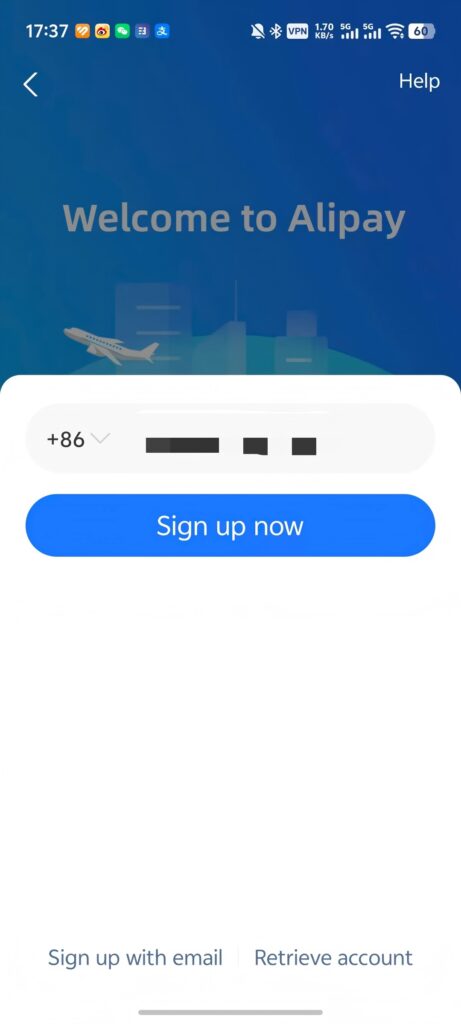
During sign-up, Alipay will send you a one-time verification code. Enter the code, and your account will be ready to use.
It’s best to set it up before you leave for your trip, so you won’t have to finish registration after you arrive in China or pay roaming fees to get the code.
After you sign up, you can set a login password if you want to. You can also skip it for now, since you’ll still be able to log in later with a one-time code.
3. Link your debit or credit card
On the Alipay home screen, look for the option to add a bank card near the middle of the screen.
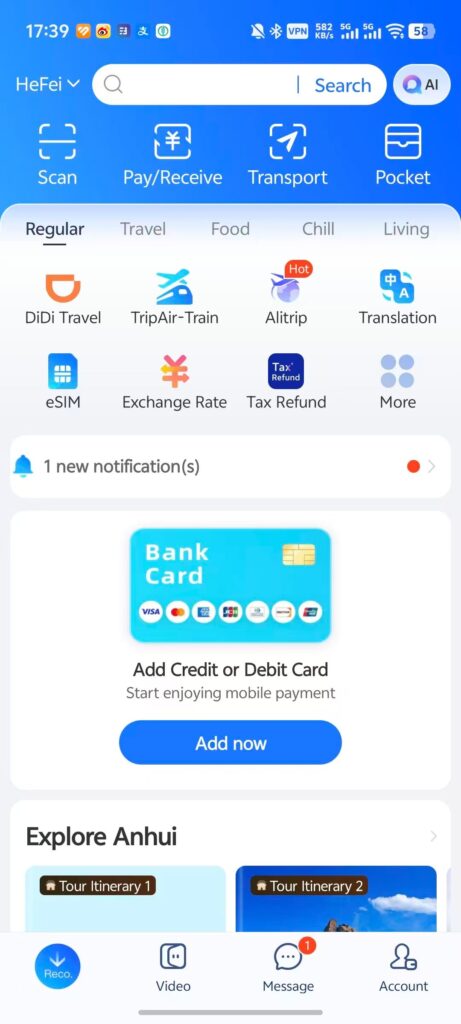
Tap it, then enter your card details.
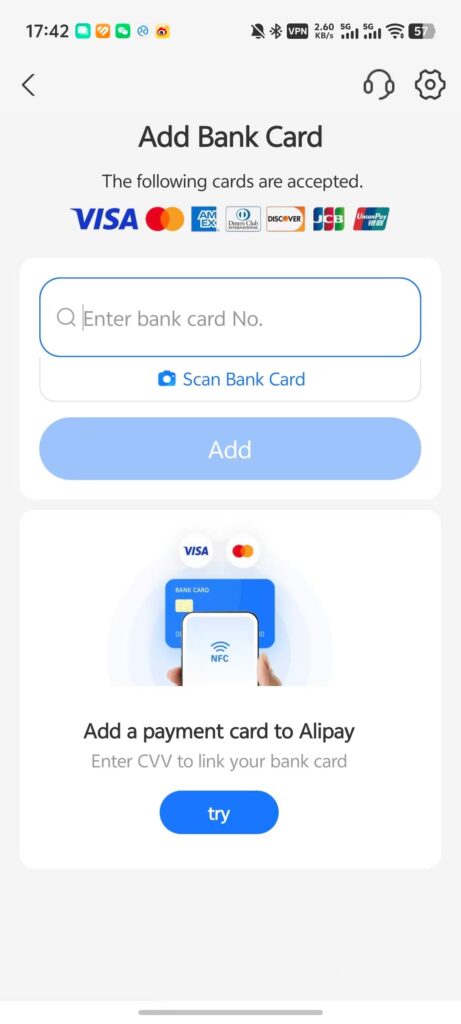
Alipay currently supports Visa, Mastercard, JCB, Discover, and Diners Club debit and credit cards. It doesn’t support American Express yet, though that may change in the future.
Your bank may ask you to verify the card, for example by entering a one-time code sent by SMS.
Once your card is linked, Alipay will prompt you to set a six-digit payment PIN, which you’ll use to confirm your payments.
I also recommend turning on fingerprint or face recognition for payments, if your phone supports it. That way, you won’t have to enter your PIN every time, which makes paying much quicker.
4, Verify Your Identity
You can use Alipay without verifying your identity, but some features will be limited, so I definitely recommend doing this before your trip.
What Changes After Identity Verification?
1. Higher payment limits
After you verify your identity, your payment limits go up significantly.
| Limit | Verified | Not verified |
|---|---|---|
| Per transaction | 5,000 USD | 500 USD |
| Annual total | 50,000 USD | 2,000 USD |
That said, even without verification, these limits are still enough for most tourists.
2. Unverified users are more likely to face security checks or temporary restrictions
This is the main reason I think it’s worth verifying your identity before your trip. Financial regulation in China is fairly strict, so frequent payments, or one large payment, can trigger a security review if your account isn’t verified.
If that happens, you’ll need to verify your identity before you can use your account again, which means you won’t have access to all of Alipay’s payment or travel features.
3. You can send and receive money
If your account isn’t verified, you won’t be able to send or receive money.
For short-term visitors, that may not sound like a big deal, but some small vendors use personal Alipay QR codes that may not accept credit cards or foreign debit cards.
In this case, you can give the equivalent amount in RMB cash to someone at your hotel’s front desk, your tour guide, or a local Chinese friend you trust, and ask them to transfer it to your Alipay account.
Also, if your linked bank card doesn’t go through on a payment, you can still pay from your Alipay balance.
While you can technically pay for things in cash, it’s uncommon in China now, and small vendors may not have enough change on hand.
Read More: How to Pay for Things in China as a Foreign Visitor?
How to Verify Your Identity in Alipay
Sometimes Alipay will show an identity verification prompt while you’re adding a bank card. If you don’t see that prompt, you can verify your identity manually:
- Go to Me → Settings → Account and Security → Identity Information.
- Fill in your personal details and upload your passport.
- Submit your information for review.

A few things to know:
- The review usually takes up to 24 hours.
- The name you enter must match the name on your passport exactly.
- Your passport photo must be clear.
How to Pay with Alipay
Once your account is set up, there are a few different ways to pay with Alipay.
Method 1: Scan a QR Code
Tap Scan on the Alipay home screen, scan the merchant’s QR code, enter the amount, and confirm the payment.
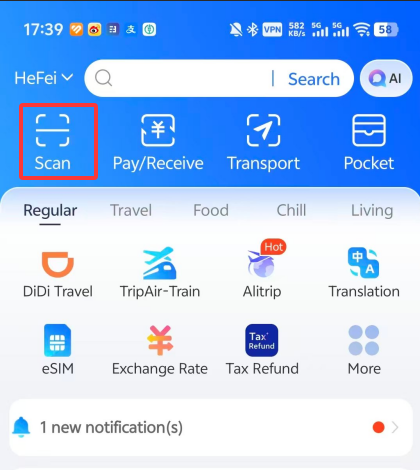
- This is the method you’ll probably use most at small shops, street stalls, and in taxis.
Method 2: Show Your Payment Code
Tap Pay/Receive on the Alipay home screen. The first time you use it, you’ll need to activate your payment code and set a payment PIN.
Show the QR code on your screen to the merchant and they’ll scan it with their device. Depending on your settings, the payment may go through automatically, or you may need to confirm it yourself.
Important: Always check the final amount before the payment goes through. If anything looks wrong, tell the merchant right away.
This is more common at supermarkets, chain stores, shopping malls, and larger restaurants.
Method 3: Pay in a Merchant’s App or Mini Program
If you’re paying in a merchant’s app or mini program, choose Alipay at checkout and follow the prompts.
For example, if you order takeout or book a ride in an Alipay mini program, you’ll see an option to pay with Alipay.
Method 4: Tap to Pay
This is my favorite way to pay, and it’s also the fastest. You’ll usually see this option at places like supermarkets, malls, hotels, and restaurants.
You don’t need to open Alipay first. Just unlock your phone, hold it near the merchant’s payment terminal, and the payment will go through right away.
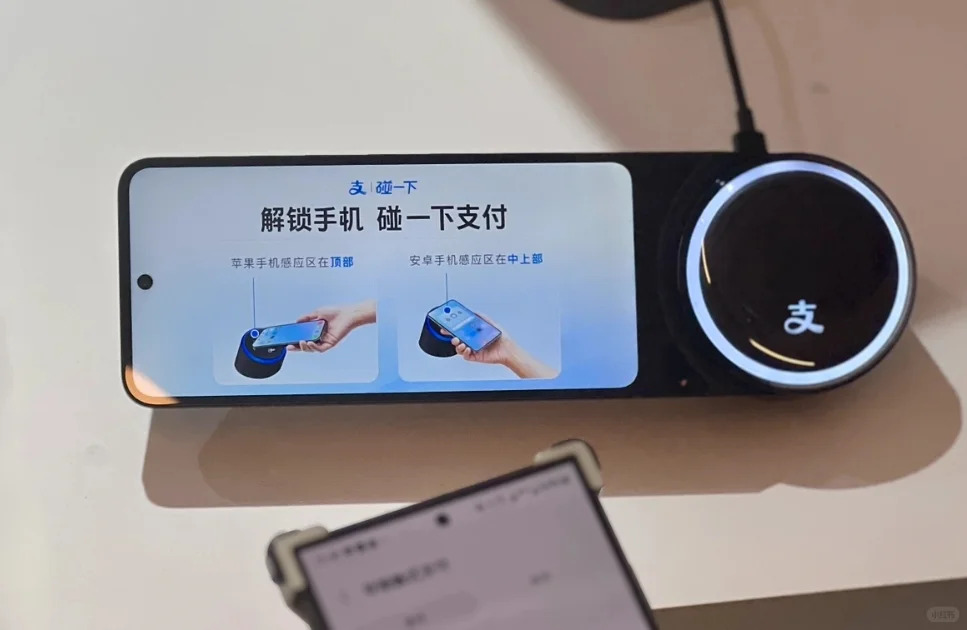
Your phone needs to support NFC (Near Field Communication) for this to work.
This is more common at supermarkets, chain stores, shopping malls, and larger restaurants.
Alipay Transaction Fees
Currently, smaller Alipay payments are fee-free. If a single payment is under RMB 200, there’s no fee. If it’s over RMB 200, Alipay charges a 3% fee. For example, if you pay RMB 199, there’s no fee. But if you pay RMB 201, you’ll be charged about RMB 6 in additional fees.
In addition to any fees charged by Alipay, your bank may charge a foreign transaction fee, which can be as high as 3.5%. There may also be a card-network fee of up to 2%.
These fees can add up, so if you travel internationally often, a Wise virtual debit card may be a good option to avoid them.
Wise doesn’t charge a separate foreign transaction fee and uses the mid-market exchange rate, which may be better than the exchange rate offered by your bank.
You can apply for one online and link it to Alipay or WeChat. After your trip, you can freeze the virtual card in the Wise app for added security.
Tips for Avoiding Extra Fees
1. If the amount is over RMB 200, ask whether the merchant can split the payment
For example, if your total is RMB 590, you can ask the merchant to split it into three separate payments, each under RMB 200.
You can save this Chinese sentence on your phone and show it to the merchant:
支付宝付款超过200元,会收取我手续费,我可以分多次付款吗?谢谢。
This means:
Alipay charges me a fee when the payment is over RMB 200. Would it be okay to split it into a few smaller payments? Thank you.
If it’s not a hassle for the merchant, they’ll usually agree.
2. For a longer stay, consider getting a local Chinese bank card
If you’re coming to China for work or staying for a longer period, I strongly recommend getting a local Chinese bank card.
That way, you won’t have to pay these extra fees every time you buy something. You’ll also be able to transfer money to other people and withdraw your balance to your bank account.
Useful Alipay Features for Travel in China
As I mentioned earlier, Alipay isn’t just a payment app. It also includes a lot of third-party mini programs, so you can use it for much more than payments. Here are two features you’ll probably use during your trip:
Public Transportation
Alipay has a Transport section you can use for public transit. Once you set it up, you can use Alipay for buses and subways in many cities. You won’t need to buy a separate transit card, and you won’t need to carry cash, which is much more convenient.
How to Use It
1, Open Alipay and tap Transport at the top of the screen.
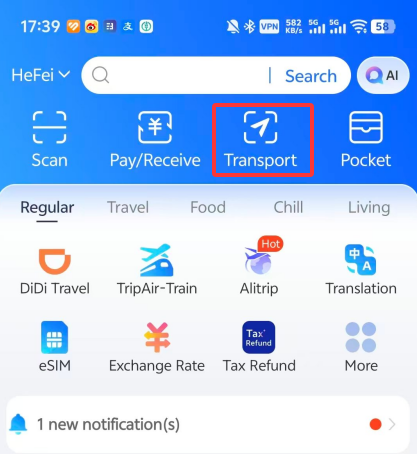
2, In most cases, Alipay will detect your current city automatically. If location access isn’t turned on, tap the city name at the top and change it to the city you’re in.
3, The first time you use it, you’ll need to activate it manually.
Tap Go to View (前往领取), then tap Activate. After that, accept the terms and tap Agree and Obtain Card.
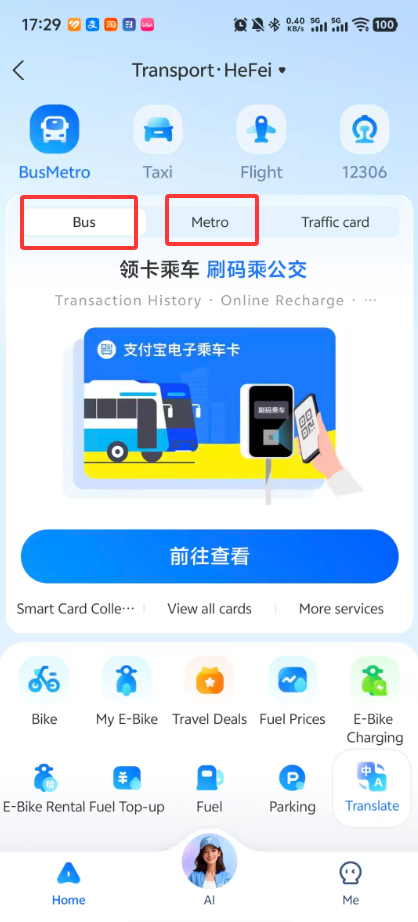
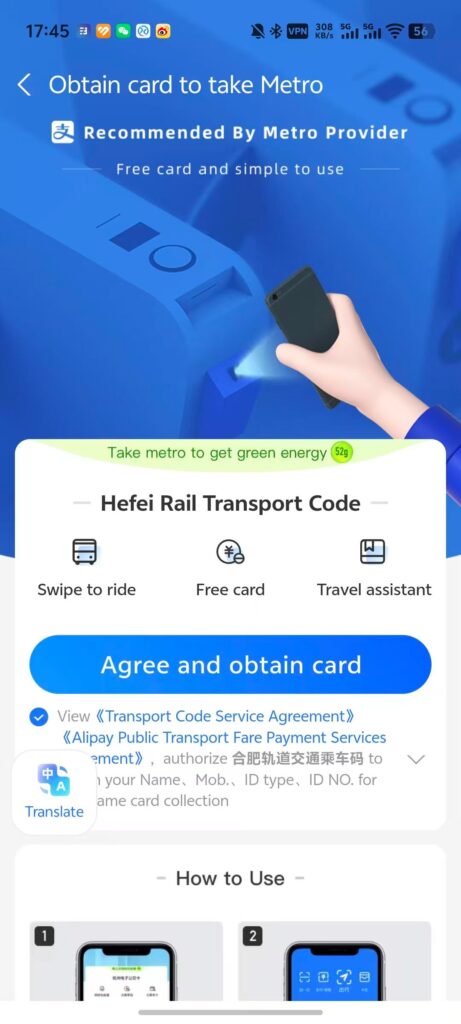
Once it’s activated, you’ll get a transit QR code.
When you take a bus or subway, just hold the code up to the gate or scanner. The fare will be charged automatically to your linked bank card or Alipay balance.
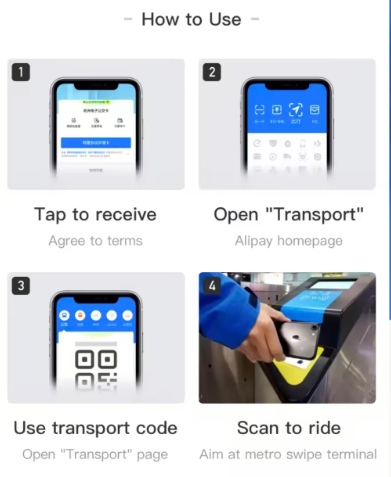
Note: In some cities, bus and subway codes are separate. For example, in Hefei, Anhui, you need to activate them separately and make sure you use the right code for each ride. In other cities, such as Shanghai, one code works for both buses and subways.
Ride-Hailing
Another feature worth getting familiar with is ride-hailing.
Ride-hailing in China is usually quite affordable, so you may end up using it even more than public transportation during your trip.
How to Use It
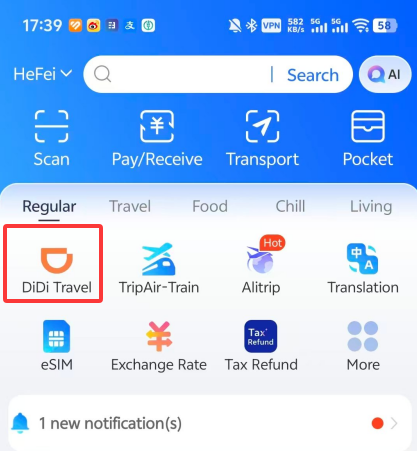
1, Open Alipay and look for Didi Travel near the top of the home screen. If you don’t see it, type Didi into the search bar at the top.
2, Open the Didi Travel mini program, then enter your destination in the “Where to?” field at the Middle.
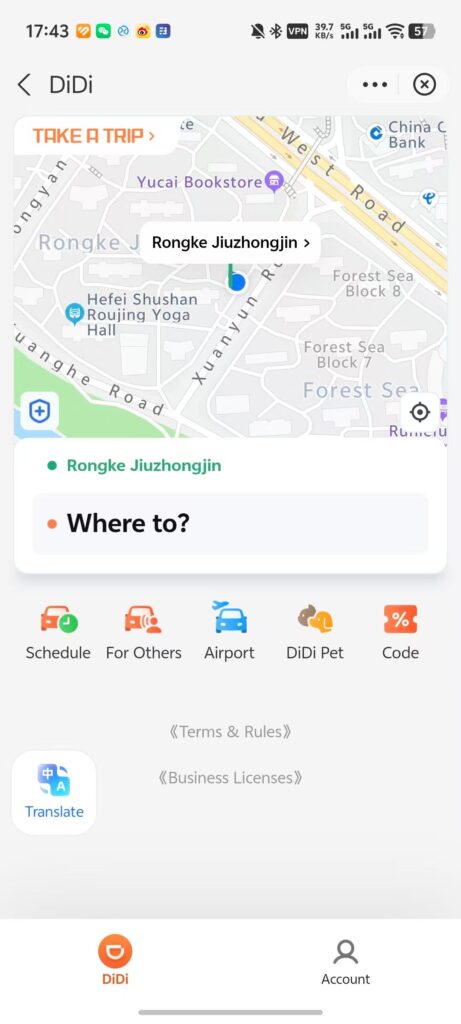
For most destinations, you can search in English, but for less well-known places, English may not work, in which case search in Chinese.
If this is your first time using it, Didi will ask you to log in after you enter your destination.
Agree to the terms and log in with the phone number linked to your Alipay account. You’ll receive a one-time verification code, and once you enter it you’ll be able to search for rides.
After you log in, you’ll see the available car types, the estimated arrival time, and the estimated fare, which is usually close to the final amount you’ll pay.
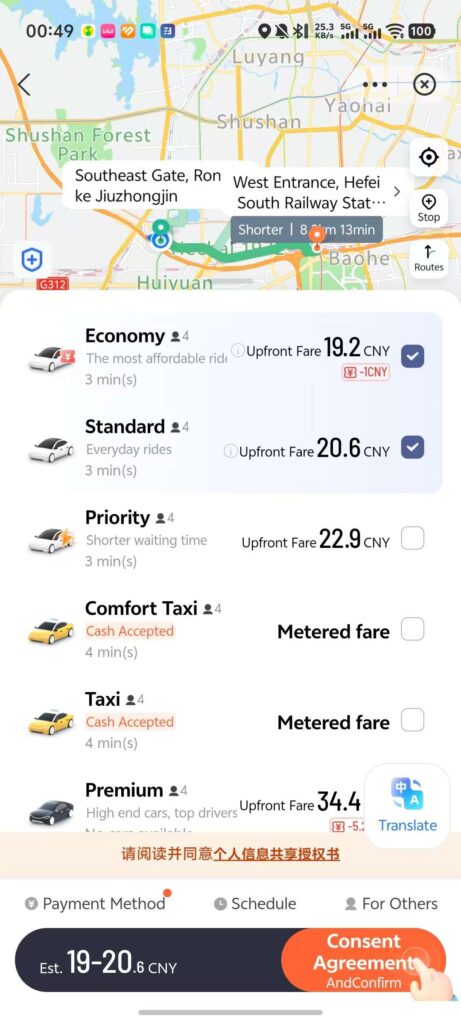
In most cases, Economy or Standard is the best choice, as these usually have the most cars available and the lowest prices. If you want a more comfortable ride, choose one of the higher-tier options.
Tap Confirm, and Didi will match you with the nearest available car in the category you selected.
The app will show the estimated arrival time, but unless it’s raining or you’re traveling during rush hour, you usually won’t need to wait more than 10 minutes.
Once you get into the car, you will tell the driver the last four digits of your phone number so they can confirm you’re the right passenger.
In most cases, the fare will be charged automatically through Alipay after the ride ends. In some cases, Didi may place a temporary hold when you book the ride, then refund the difference once the final fare is confirmed.
Other Useful Alipay Mini Programs
On the Alipay home screen, you’ll also find a variety of other mini programs that are useful for travelers, including an exchange rate calculator, eSIMs, tax refunds, flight bookings, food delivery, and more.
Before your trip, it’s worth spending a little time exploring Alipay. You’ll probably come across a few mini programs that end up being especially useful during your trip.
Translate Mini Programs into English with One Tap
Many travel-related mini programs in Alipay already have English versions, including Didi and the Transport section. But in my experience, even if you switch the interface to English, you may still run into some Chinese here and there.
Some food delivery mini programs, including Takeout and Meituan, still aren’t fully available in English.
When that happens, you can use Alipay’s built-in translation tool to translate the whole mini program into English.
In Alipay, you’ll see a floating Translate button. Tap it once, and it will automatically translate the entire mini program.
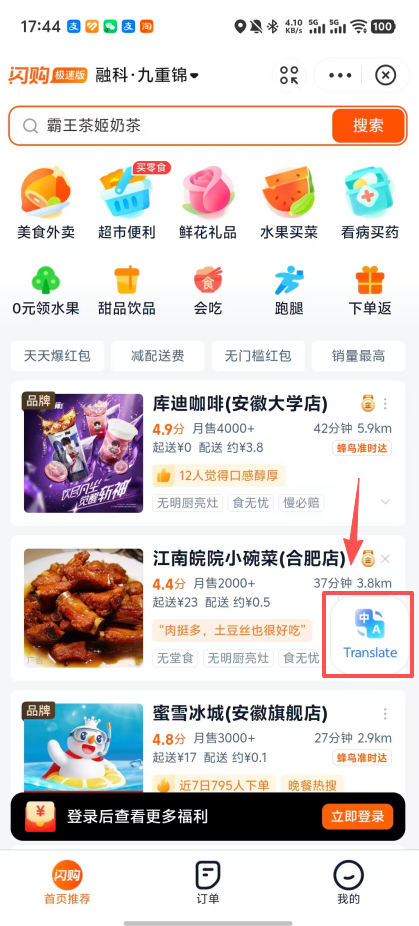
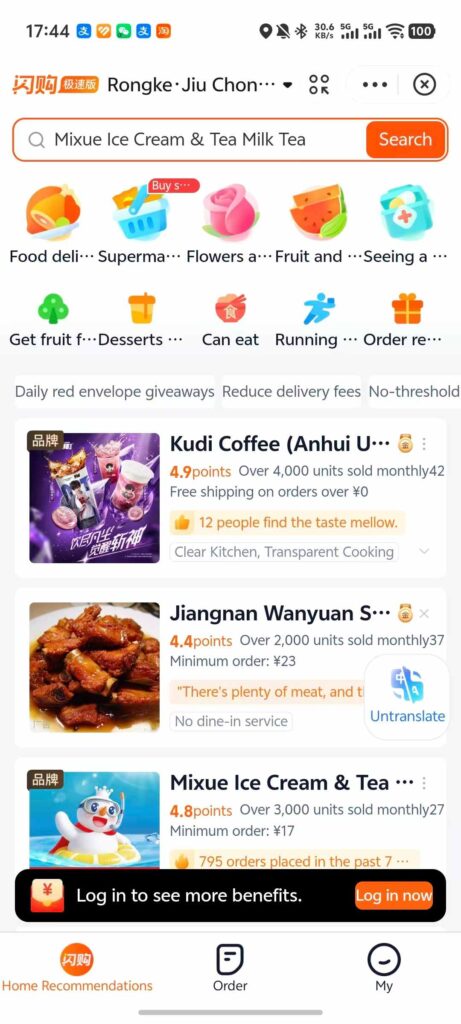
If English isn’t your native language, you can also press and hold the Translate button and choose the language you prefer.
It’s machine translation, of course, but it’s usually enough to help you understand what you need.
Read More: How to Travel in China Without Speaking Any Chinese: Translation Apps + Simple Communication Tricks
Another Option: WeChat
WeChat is another very common way to pay in China. Since it’s mainly a messaging app, almost everyone already has it on their phone, and most people are used to paying with it too.
In some ways, it works a lot like Alipay, and it also has a wide range of mini programs. In other words, most things you can do in Alipay, you can also do in WeChat.
But in terms of payments specifically, Alipay has a simpler interface.
Compared to WeChat, it takes one fewer tap to get to the payment screen. Alipay also gives you more ways to pay. For example, tap to pay is the fastest option. Not many merchants support tap to pay with WeChat, but most places that offer it support it through Alipay.
My recommendation is to install both Alipay and WeChat, so that if one app doesn’t work for a payment, you can switch to the other one right away.
But if you only want to install one app for your trip, I’d actually recommend WeChat, because it’s so useful for messaging.
I always suggest that travelers add someone from their hotel’s front desk, their tour guide, or any local Chinese friends they know on WeChat. That way, if something comes up during your trip, you’ll be able to reach someone quickly for help.
Read More: WeChat: A Complete Guide to Using WeChat & WeChat Pay in China
Final Thoughts
Alipay is one of the most widely used payment methods in China, and once it’s set up, it will make paying for things on your trip easy. And since very few people in China use cash now, having a payment app, and knowing how to use it, is essential.
Identity verification can take a bit of time, so it’s best to get everything set up before your trip. That way, once you arrive in China, you can start using Alipay right away.
If you still have questions about Alipay or paying while traveling in China, feel free to leave a comment and I’ll reply as soon as I can.
FAQ: Using Alipay in China
Read More:
Public Transport in China – Guide to Metro, Bus and How to Pay
Essential Apps you need for Traveling in China
Essential Things to Do Before Traveling to China